How the Deadly Days: Roadtrip backpack works: grid shapes, adjacency, merging, extra columns, Auto Equip, and layouts for damage, crit and sustain.
Deadly Days Roadtrip Backpack Guide: Space, Shapes, Synergy
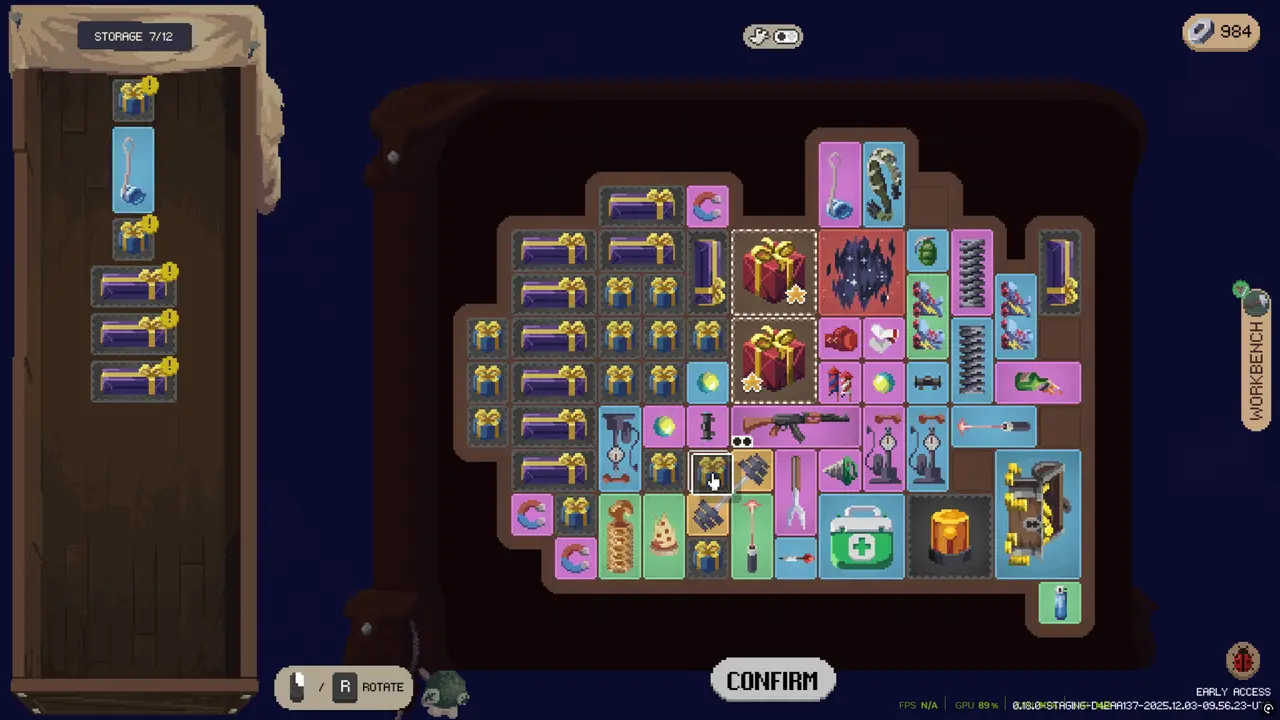
The backpack is not an inventory. It is the build. A weapon's card tells you its damage; the grid tells you whether that damage is multiplied by three neighbours or stranded in a corner next to a healing item that does nothing for it. Players who learn this early stop losing runs to "bad luck" and start losing runs to bad layouts, which are fixable.
Official source: Deadly Days: Roadtrip store page
More sources: Pixelsplit — Deadly Days: Roadtrip and Steam news hub.
The three rules of the grid
Rule one: every item is a shape. A pistol might take two cells; a shotgun takes a wider block; a support item might take one. The shape is fixed. You cannot rotate it, and you cannot overlap it. Before you buy anything, count the cells it needs and find the hole it fits.
Rule two: adjacency is directional. Items affect neighbours, and the effect usually has an intended direction — a damage booster wants to touch a weapon, not another booster. The UI shows the link when an item is selected. A buff that touches nothing is a stat stick; the same buff touching two weapons is a build.
Rule three: duplicates merge. Two copies of the same item combine into the next rarity. The merged item keeps a better version of the effect and usually keeps its shape or grows slightly. Merging is almost always correct: two rares occupying two spaces are worth less than one epic occupying one, because the epic frees a cell for another multiplier.
Reading a weapon card properly
A weapon card has four things worth comparing:
- Base damage per hit. Useful, but misleading without rate of fire.
- Rate of fire. Fast weapons scale better with on-hit effects; slow weapons scale better with flat damage multipliers.
- Shape and size. A large weapon costs opportunity, not just a slot.
- Trigger. Some items fire on a timer, some on a hit, some when another item triggers. Trigger type decides what can buff it.
The 1.0 build made ranged weapons fire at their stated rate regardless of frame rate, so a "50 shots per second" weapon is now actually 50. If you are comparing an old favourite against a new drop, the old favourite may have been quietly nerfed by the fix.
Layout patterns that work
There is no single correct layout, but three patterns solve most runs.
The column
Stack one weapon with two or three support items in a vertical line. The weapon touches every support item; the support items touch each other. This is the most space-efficient pattern for a single carry weapon.
The ring
Put the main weapon in the centre and surround it with four one-cell items. This maximises adjacency for the weapon at the cost of a square footprint. It is the right pattern for a boss-killer weapon and the wrong pattern for a farming build that needs bag space.
The block
Group all weapons on one side and all support on the other, with a single row of "bridge" items that touch both. This is how you run two damage types without doubling your support investment. It is harder to maintain as the bag grows, but it scales into the late game.
A five-cell weapon that forces you to drop two multipliers is worse than a three-cell weapon with a full ring. When a new drop arrives, compare the whole footprint, not the damage line.
Expanding the grid
Backpack space comes from three sources: base upgrades, in-run bag items, and co-op columns.
- Base upgrades are permanent and apply to every survivor. They are the safest long-term investment.
- In-run bags add columns for that run only. Take them when offered early; a column on day one compounds for the whole route.
- Co-op columns unlock separately, and each player's backpack can grow one extra column. The grids can touch, which matters for cross-backpack synergies.
A wide bag is not automatically better. Every extra column is also an extra place to put a bad item. Space is only valuable if you have something worth putting in it.
What not to carry
New players treat empty cells as a failure state. They are not. Three categories of item are usually not worth their footprint:
- Defensive items with no trigger. A flat armour item is fine on a melee build and dead weight on a ranged build that never gets hit.
- Duplicate utility. Two healing items do not stack if the second one only triggers below a threshold the first one already covers.
- Quest items after the quest. If a pumpkin or a blood bag has served its purpose, sell it or stash it. It is occupying a cell that a multiplier could use.
The items list marks which items are worth carrying for their shape alone.
Merging, crafting, and the hammer
Merging is automatic when duplicates meet. Crafting is deliberate: specific combinations produce specific items, and the 1.0 build added five craft-only weapons. The Hammer is the third path — it upgrades marked items one rarity at the end of the day, but it cannot push an item past the Hammer's own rarity.
The practical order is: merge duplicates as soon as you have space; craft when the recipe fills a gap in your build; hammer at the end of a day, after you have decided which items are staying. The crafting guide lists the confirmed recipes.
Co-op changes the geometry
In co-op, selectors can mark items in your partner's backpack. That means a support item in their bag can buff a weapon in yours, provided the grids touch and the selector reaches. Each player also gets one extra unlockable column. The result is a combined build that is stronger than two solo builds, but only if you talk about who is carrying the multipliers.
Read the co-op guide before your first shared run; the stat screen splits damage per player, and the lower number is dimmed, which is a useful diagnostic and a terrible argument starter.
A starter layout to copy
If you want a layout to imitate while you learn:
- Put your best ranged weapon in the second column from the left.
- Put a damage multiplier directly above it and a rate-of-fire or crit item directly below.
- Put healing and utility in the far-right column, away from the weapon.
- Keep the bottom row empty for pickups.
- Move the weapon, not the support, when you expand.
This is not optimal. It is stable, and stability is what lets you learn the rest of the game.
FAQ
Can items be rotated? No. Shapes are fixed, which is why footprint matters as much as stats.
Do adjacency bonuses stack? Yes. An item touching two valid neighbours applies to both, and some effects explicitly scale with the number of marked items.
Should I sell duplicates instead of merging? Merge first. Sell only when the merged rarity is already capped or the item is outside your build.
Does the backpack persist between runs? No. The grid and its contents are per run. Base upgrades and unlocks persist.
Related
More Deadly Days: Roadtrip Guides
Deadly Days: Roadtrip codes checked for the 1.0 build: how to redeem, which strings are confirmed, which are community reports, and the scams to avoid.
How crafting works in Deadly Days: Roadtrip: duplicate merging, confirmed recipes, the five craft-only 1.0 weapons, and when to hammer an item.
What duct tape unlocks in Deadly Days: Roadtrip, the reliable sources (bosses, reaper, achievements), and the order worth spending it in.
How Endless Mode scales in Deadly Days: Roadtrip, which builds survive the curve, and the item priorities that stop a finished run from falling over.
The extraction decision in Deadly Days: Roadtrip: reading the fuel gauge, threat level, dusk timing, reaper risk, and the math of one more crate.
A working list of Deadly Days: Roadtrip items: support, trigger, mobility, sustain, cursed merchant goods and character items, with what each one does.
How legendary loot works in Deadly Days: Roadtrip: rarity, merging, glowing crates, the radar, boss drops, and the fastest ways to farm high-rarity gear.
Every Deadly Days: Roadtrip map system explained: biome enemies, fuel icons, shops, event stops, Labyrinth, Pumpkin Patch, and route planning.